Home Navigation

Tuesday, 9 February 2021

Mongodb replica with docker compose

Clone the repo to get the docker-compose.yml and related files

You will see the below files after cloning the repo


To run a standalone server:
$docker-compose -f docker-compose-standalone.yml up -d

To run  replicated servers:

$chmod 400 resource/mongod-keyfile

$./setup_replica.sh

$docker exec -it mongodb1 bash

$mongo -u root -p admin

Enjoy!

Monday, 1 February 2021

Kafka basics

 What is Kafka?

Apache Kafka is an open-source stream-processing software platform developed by LinkedIn and donated to the Apache Software Foundation, written in Scala and Java. The project aims to provide a unified, high-throughput, low-latency platform for handling real-time data feeds. (Wikipedia).

Apache Kafka is a publish-subscribe based durable messaging system. A messaging system sends messages between processes, applications, and servers.

Topics:

A Topic is a category/feed name to which records are stored and published. A topic is a particular stream of data. Similar to a table name in a database.

Partitions:

Kafka topics are divided into a number of partitions, which contain records in an unchangeable sequence. Each record in a partition is assigned and identified by its unique offset. A topic can also have multiple partition logs. This allows multiple consumers to read from a topic in parallel. Each message in partition gets an incremental id called offset.

Offset:

  • Offset are like indexes in an array. 
  • Order is guaranteed only within a partition (not across partitions)
  • Data is kept only for a limited time (Default is one week)
  • Data is assigned randomly to a partition unless a key is provided

Broker & Cluster:

Cluster is a collection of brokers. Brokers are the Kafka servers. Every Kafka broker is also called a “bootstrap server”. It means you only need to connect to one broker and you will be connected to the entire cluster.

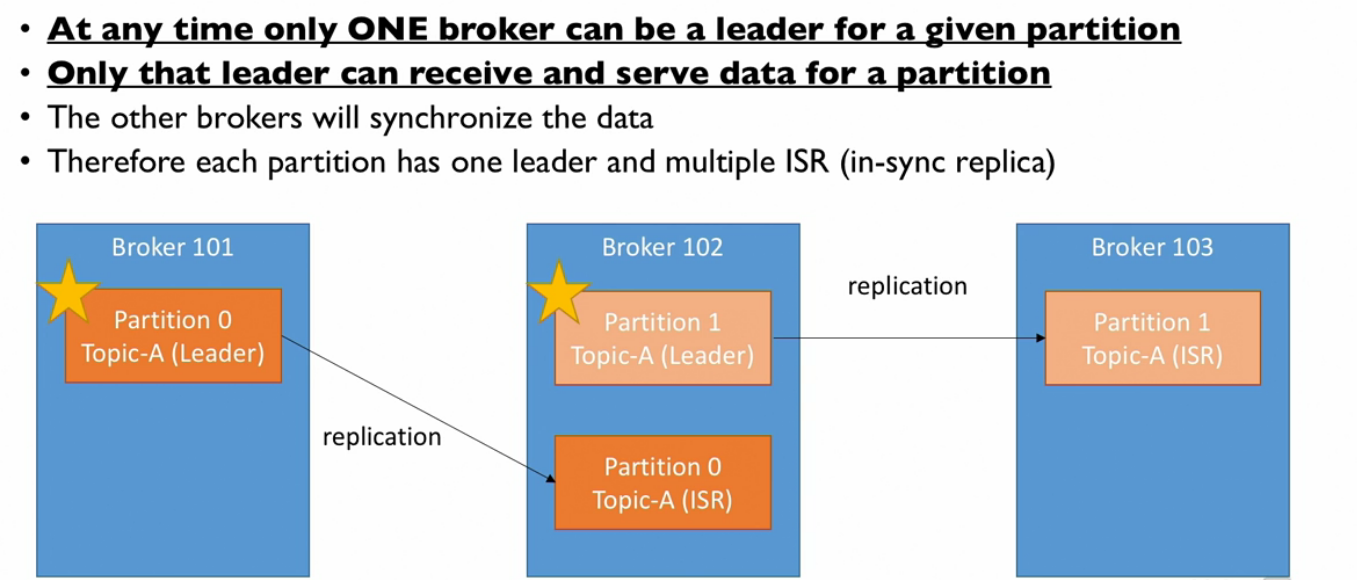
Leader:

    • At any time one broker can be a leader for a given partition
    • Only that leader can receive and serve data for a partition
    • The other brokers will synchronize the data
    • Therefore each partition has one leader and multiple ISR ( in-sync replica)


Replicas:

Replicas are nothing but backups of a partition. If the replication factor of a topic is set to 4, then Kafka will create four identical replicas of each partition and place them in the cluster to make them available for all its operations. Replicas are never used to read or write data. They are used to prevent data loss.


Producers:

Producers writes data to topics
Message Key:
Producers can choose to send a key with the message 
    • key=null: data is sent round robin (Broker0 then Broker1 then Broker2)
    • key!=null: all messages for that key will always go to the same partition.
A key is sent if you need message ordering for a specific field.

Key Hashing:
    • By default it uses "murmurmur2" algorithm
    • Formula: targetPartion = Utils.abs(Utils.murmur2(recover.key())) % numPartitions
adding/removing partitions to a topic will completely alter the formula

        Acknowledgement:
Producers can choose to receive acknowledgment of data writes
    • ack = 0: Producers won't wait for acknowledgment ( Possible data loss)
    • ack = 1: Producers will wait for leader acknowledgment ( limited data loss)
      • Leader response is requested but replication is not a guarantee.
      • If ack is not received, the producer may retry
      •  If leader broker goes offline but replicas haven't replicated the data yet, we have a loss of data
    • ack = all: Leaders + replicas acknowledgment ( no data loss)


      • Acks=all must be used in conjunction with min.insync.replicas
      • min.insync.replicas can be set a the broker or topic level (Override)
      • min.insync.replicas=2 implies that at least 2 brokers that are ISR(including leader) must response that they have data
      • That means if you use replication.factor = 3, min.insync=2, ack=all, you can only tolerate I broker going down, otherwise the producer will receive an exception on send.
        enable.idempotence=true ( producer level ) + min.insync.replicas=2 ( brokder/topic level)
        implies ack=all, retries=MAX_INT, max.in.flight.requests.per.connection=5 (default)

    Compression:

    • Producer usually send data that is text-based e.g. with JSON data which are large in size
    • In this case, it is important to apply compression to the producer
    • Compression is enabled at the producer level doesn't require change at broker or in the consumer
        Compression Type:
      • "compression.type" can be 'none' (default), 'gzip', 'Iz4', 'snappy'
      • compression is more effective on the bigger batch of data
      • Always use compression if you have high throughput
      • consider tweaking linger.ms and batch.size to have bigger batches and therefore more compression and higher throughput.
    • By default, kafka tries to send records as soon as possible
    • It will have up to 5 request in flight, meaning up to 5 messages individually sent at the same time
    • After this if more message have to be sent while others are in flight, kafka is smart and will start batching them while they wait to send them all at once.
            Linger.ms:
            Number of milliseconds a producer is willing to wait before sending a batch out. ( default 0)
    • By introducing some lag ( for example linger.ms=5 ) we increase the chances of messages being sent together in a batch
    • By introducing a small delay, we can increase throughput, compression and efficiency of a producer
    • If a batch is full ( batch.size ) before the end of the linger.ms period, it will be sent to kafka right away! 
            batch:size:    
            Maximum number of bytes that will be included in a batch. The default is 16KB.
    • Increasing a batch size to 32KB or 64KB can help increasing the compression, throughput, and efficiency
    • Any message that is bigger than the batch size will not be batched
    • A batch is allocated per partition, so make sure that you don't set it to a number that is too high other it will waste memory
    • You can monitor the average batch size metric using kafka producer Metrics
            Advantages:
      • Much smaller producer request size
      • Low latency
      • Better throughput
      • Store messages on disk are smaller in broker
            Disadvantages:
      • Producers must commit some CPU cycles to compression
      • Consumers must commit some CPU cycles to decompression
           Note: If the producer produces faster than the broker can take, the border can take the records will buffer in buffer.memory and fill back down when the throughput to the broker increases max.block.ms=60000: the time .send() will block until throwing an exception.
      • The producer has fill up its buffer
      • The broker is not accepting any new data
      • 60 seconds has elapsed

Consumers:

Consumers read data from topics
  • Kafka stores the offsets at which a consumer group has been reading
  • It will be stored in a Kafka topic and that Kafka topic is named __consumer_offsets.
  • When consumer in a group has processed data received from kafka, it should be comitting the offsets
  • If a consumer dies it will be able to read back from where it left off.

    Delivery Semantics:

    • At most once: Offsets are committed as soon as the message batch is received. If the processing goes wrong, the message will be lost.
    • At least once (usually): Offsets are committed after the message is processed. If the processing goes wrong, the message will be read again. This can result in duplicate processing of messages. Make sure your processing is idempotent ( unique)
    • Exactly once: It can be achieved for Kafka to Kafka workflows using Kafka Streams API. For Kafka to External System workflows use an idempotent consumer.
        
        There are two ways to make consumer record idempotent ( Unique)
    1.  Kafka generic id:- You can take the help of kafka to generate unique id by appending simple strings like String id = record.topic()+"-"+record.partition()+"-"+record.offset();
    2. Application supplied unique value:   You can generate unique value from producer supplied record. 

        Consumer offset strategy:
    • enable.auto.commit = true & synchronous processing of batches, offsets will be committed automatically for you at regular interval by default auto.commit.interval.ms=5000, every time your call .poll(), if you don't use synchronous processing, you will be in "at-most-once" behavior because offsets will be committed before your data is processed
    • enable.auto.commit = false & synchronous processing of batches. you control when you commit offsets and what's the condition for committing them.
        Consumer offset reset strategy:
    • auto.offset.reset=latest // will read from the end of the log
    • auto.offset.reset=earliest // will read from the start of the log
    • auto.offset.reset=none // will throw exception if no offset is found
if a consumer hasn't read new data in 7 days, consumer offset can be lost, it can be controlled by offset.retention.minutes
To Replay data for a consumer group
Take all consumer from a specific group down
Use kafka-consumer-groups command to set offset to what you want restart consumers

        Poll Behavior:
            
                fetch.min.bytes:
      • Controls how much data you want to pull at least on each request
      • Helps improving throughput and decreasing request number
      • At the cost of latency
                Max.poll.records ( default 500)
      • Controls how many records to receive per poll request
      • Increases if you messages are very small and have a lot of available RAM
      • Good to monitor how many records are polled per request.
                Considerations
      • set proper data retention period & offset retention period
      • Ensure the auto offset reset behavior is the one you expect / want
      • use replay capability in case of unexpected behavior

Zookeeper: 

  • Manages brokers keeps a list of them
  • It helps in performing leader election for partitions.
  • It sends the notification to Kafka in case of changes. ( e.g. new topic, broker dies, broker comes up, delete topic etc.)
  • Kafka can not run without zookeeper.
  • It by design operates with an odd number of servers.
  • It has a leader(Leader handle the writes from the brokers) the rest of the servers are followers (handle reads).
  • Zookeeper does not store consumer offsets with Kafka.

Kafka Guarantees:

  • Messages are appended to a topic-partition in the order they are sent.
  • Consumers read messages in the order stored in a topic-partition.
  • With a replication factor of N, producers and consumers can tolerate up to N-1 brokers being down.
  • As long as the number of partitions remains constant for a topic, the same key will always go to the same partition.


Monday, 11 January 2021

Linux Awk scripting cheatsheet

 What is awk? 

It’s a full scripting language, as well as a complete text manipulation toolkit for the command line.

Awk is used for to transform data files and produce formatted report.

They way it works
  • Scans a file line by line
  • Splits each input line into fields
  • Compare input line/fields to pattern
  • Performs action on matches lines
in the terminal if you type awk and hit enter you should see the blow output which will show the parameters it accepts and the format of the command.

/$ awk
Usage: awk [POSIX or GNU style options] -f progfile [--] file ...
Usage: awk [POSIX or GNU style options] [--] 'program' file ...
POSIX options:          GNU long options: (standard)
        -f progfile             --file=progfile
        -F fs                   --field-separator=fs
        -v var=val              --assign=var=val
Short options:          GNU long options: (extensions)
        -b                      --characters-as-bytes
        -c                      --traditional
        -C                      --copyright
        -d[file]                --dump-variables[=file]
        -e 'program-text'       --source='program-text'
        -E file                 --exec=file
        -g                      --gen-pot
        -h                      --help
        -L [fatal]              --lint[=fatal]
        -n                      --non-decimal-data
        -N                      --use-lc-numeric
        -O                      --optimize
        -p[file]                --profile[=file]
        -P                      --posix
        -r                      --re-interval
        -S                      --sandbox
        -t                      --lint-old
        -V                      --version

To report bugs, see node `Bugs' in `gawk.info', which is
section `Reporting Problems and Bugs' in the printed version.

gawk is a pattern scanning and processing language.
By default it reads standard input and writes standard output.

Examples:
        gawk '{ sum += $1 }; END { print sum }' file
        gawk -F: '{ print $1 }' /etc/passwd

Create file in any of the directory you choose with following contents
A,AB,ABC,ABCD
B,BA,CBA,C200
C,AC,ACB,100b
D,CD,BCD,98
F,GH,ABC,XYZ,LF

awk -F, '{ print }' file // -F, is the separator, here the separator is ,
A,AB,ABC,ABCD
B,BA,CBA,C200
C,AC,ACB,100b
D,CD,BCD,98
F,GH,ABC,XYZ,LF

$awk -F',' '{ print $1}' file
A
B
C
D
F

$0: Represents the entire line of text.
$1: Represents the first field.
$2: Represents the second field.
$7: Represents the seventh field.
$45: Represents the 45th field.

$awk -F',' '{ print $1, $3}' file
A  ABC
B  CBA
C  ACB
D  BCD
F  ABC

OFS (output field separator) variable to put a separator between fields
$awk -F','  'OFS="/" { print $1, $3}' file
A/ ABC
B/ CBA
C/ ACB
D/ BCD
F/ ABC

Replacing all the values of column 2
$awk -F',' '{$2="1";print }' file
A 1  ABC  ABCD
B 1  CBA  C200
C 1  ACB  100b
D 1  BCD  98
F 1  ABC  XYZ  LF

Replacing all the values of colum 2 and putting a quote arround it
$awk -F, '{$2="\"1\"";print }' file
A "1"  ABC  ABCD
B "1"  CBA  C200
C "1"  ACB  100b
D "1"  BCD  98
F "1"  ABC  XYZ  LF

Number of cell in per row after splitting by ,
$awk -F, '{ print NF }' file
4
4
4
4
5

A BEGIN rule is executed once before any text processing starts. In fact, it’s executed before awk even reads any text. An END rule is executed after all processing has completed. You can have multiple BEGIN and END rules, and they’ll execute in order.
$awk  -F',' 'BEGIN {print "Hello world"} { print $0}' file
Hello world
A,AB,ABC,ABCD
B,BA,CBA,C200
C,AC,ACB,100b
D,CD,BCD,98
F,GH,ABC,XYZ,LF


$awk 'END { print NR } { print }' file
A,AB,ABC,ABCD
B,BA,CBA,C200
C,AC,ACB,100b
D,CD,BCD,98
F,GH,ABC,XYZ,LF
5

To print the first item along with the row number(NR) 
$awk -F, '{ print NR ", " $0 }' file
1,A,AB,ABC,ABCD
2,B,BA,CBA,C200
3,C,AC,ACB,100b
4,D,CD,BCD,98
5,F,GH,ABC,XYZ,LF

Conditions and regular expressions

$awk -F, '$4 > 90 { print }' file
D,CD,BCD,98

$awk -F, '$3 ~ /A/ { print $0 }' file
A,AB,ABC,ABCD
B,BA,CBA,C200
C,AC,ACB,100b
F, GH, ABC, XYZ, LF

$awk -F, '$3 ~ /^A/ { print $0 }' file
A,AB,ABC,ABCD
C,AC,ACB,100b
F,GH,ABC,XYZ,LF

for loops in awk:
$awk 'BEGIN { for(i=1;i<=6;i++) print "square of", i, "is",i*i; }'
square of 1 is 1
square of 2 is 4
square of 3 is 9
square of 4 is 16
square of 5 is 25
square of 6 is 36

$awk -F, 'length($4) > 3' file
A,AB,ABC,ABCD
B,BA,CBA,C200
C,AC,ACB,100b

awk if conditions
$awk -F, '{ if($4 == "ABCD") print $0;}' file
A,AB,ABC,ABCD

Saturday, 12 September 2020

ClassNotFoundException vs NoClassDefFoundError

ClassNotFoundException and NoClassDefFoundError both are runtime exceptions. They occur when a class not found in the classpath. 

ClassNotFoundException:

It is a checked exception. It happens when a program tries to load a class using the Class.forName() or loadClass() or findSystemClass() method. For example class.forName("oracle.jdbc.driver.OracleDriver") and oracle jdbc driver is not present in the classpath the program will try to load the class and throw the classNotFoundException.

Resolution: Make sure you add the related dependencies in the classpath.

NoClassDefFoundError:

It is a fatal error and happens when jvm can not find the definition of the class by instantiating (new keyword) and load a class with method call. The definition is present at the compile time but missing at runtime.

It usually happens when there is an exception while executing a static block or initializing static fields of the class, so class initialization fails.

Resolution: Sometimes, it can be quite time-consuming to diagnose and fix these two problems. 

  • Make sure whether class or jar containing that class is available in the classpath.
  • If it's available on application's classpath then most probably classpath is getting overridden. To fix that we need to find the exact classpath used by our application
  •  Also, if an application is using multiple class loaders, classes loaded by one classloader may not be available by other class loaders.

Ref: https://www.baeldung.com/java-classnotfoundexception-and-noclassdeffounderror

Tuesday, 1 September 2020

Git stash commands

#git stash save “Your stash message” //Git stash with message

Stashing untracked files
#git stash save -u
or
#git stash save --include-untracked

view the list of stashes you made at any time.
#git stash list

#git stash apply // applies the latest stash stash@{0}

if you want some other stash to apply
#git stash apply stash@{2} // third one

#git stash pop   // applies the latest stash stash@{0} and removes it
#git stash pop stash@{1} // applies the second one and removes it


#git stash show // summary of stash diff of the stash content
#git stash show -p // shows full diff of the stash content
#git stash show stash@{1} // specific stash diff and contents

#git stash branch <name> // creates a new branch with latest stash and removes it
#git stash branch <name> stash@{1} // if you want to specify a stash id

#git stash clear // deletes all the stashes made in the repo
#git stash drop stash@{2} // specify id to delete the stash
 

Monday, 20 July 2020

Postgres docker volume backup and restore

They way we are going to backup and restore postgres database docker volume we will use docker exec to get into the container and will use pg_dump utility to achieve our goal.

Postgres volume backup:

start your postgres container using docker or docker-compose.
execute the below command to get the container id
$docker ps

Backup database: 
    $docker exec -u postgres <containerId> pg_dump -Fc -d <databaseName> > dabase-backup.dump

Restore database:
    $docker exec -u <postgresUser> <containerId > psql -c 'DROP DATABASE <databaseName>'

    $docker exec -i -u < postgresUser > <containerId> pg_restore --clean -C -d postgres < dabase-backup.dump


Backup Schema:
    $docker exec -u postgres <containerId> pg_dump -Fc -d <databaseName> -n <schemaName> > schema-db-backup.dump
Restore Schema:
    $docker exec -it -u postgres <containerId> psql 
you will be in interactive mode, in the prompt terminal execute the below commands
    postgres=# \connect bdd
    # drop schema <schemaName> cascade
    # create schema <schemaName>
    \q to quit the interactive mode postgres
    Then execute the below command to reload db
    $docker exec -i -u postgres <containerId> pg_restore --clean -C -d <databaseName> -n <schemaName> < schema-db-backup.dump
Last step, validate your data using a database browser or you can use the below command to get into the database terminal and use sql query to validate your data.

    $docker exec -it -u postgres <containerId> psql